
생산 일정은 자동으로,
수요는 미리,
현장은 실시간으로.Schedules automated.
Demand anticipated.
Shop floor live.
BSS Smart MES는 Odoo Manufacturing 위에 블루스톤이 직접 만든 확장 스위트입니다. 수요예측(Forecasting)으로 계획을 세우고, 조건 기반 엔진이 생산 스케줄을 자동 재배치하며, AI 비전검사·설비 데이터를 실적에 자동으로 연결합니다.BSS Smart MES is Blue Stone’s own extension suite for Odoo Manufacturing. Plan with demand forecasting, let a rule engine reschedule production automatically, and connect AI vision and equipment data straight into production records.
예측에서 감사까지, 끊기지 않는 하나의 흐름From forecast to audit — one unbroken flow
수요예측Forecast
고객·제품별 예측 입력과 버전 확정Forecast by customer × product, version-controlled
MPS 반영MPS sync
확정 예측을 주생산계획에 1-클릭 적용Push confirmed forecasts to MPS in one click
스케줄 자동화Auto-schedule
조건 엔진이 작업지시 일정을 재배치Rule engine reschedules work orders
현장 실행Execution
작업 시작·완료, 실적·AI 검사 결과 수신Start/finish jobs, receive AI inspection results
품질 · 감사Quality & audit
성적서·GMP 문서·LOT 감사 패키지Certificates, GMP docs, LOT audit packages
Smart Scheduler
조건에 맞추어 생산 스케줄을 자동화합니다Automate production scheduling by your rules
작업장 일정이 겹치고 긴급 주문이 끼어들 때, 간트를 일일이 끌어 옮길 필요가 없습니다. 스케줄러가 미완료 작업지시 전체에 네 가지 조건을 동시에 적용해 새 일정을 계산합니다.When workcenters clash and urgent orders cut in, nobody has to drag Gantt bars by hand. The scheduler applies four rules to every open work order at once.
긴급 주문 우선Urgent first
우선순위가 긴급(★)인 제조지시를 먼저 배치합니다.Manufacturing orders marked urgent (★) go first.
납기일 우선Earliest deadline
납기가 빠른 순으로 정렬해 납기 위험을 줄입니다.Sorted by deadline to cut delivery risk.
작업장 용량Workcenter capacity
동시 작업 한도를 넘지 않게 충돌을 해소합니다.Respects concurrent job limits and resolves clashes.
근무 캘린더Working calendar
교대·휴식시간을 피해 다음 가용 시간대에 배치합니다.Schedules only within shifts, skipping breaks.
실제 Odoo 화면으로 보는 Smart SchedulerSmart Scheduler — real Odoo screens
 클릭해서 크게 보기Click to enlarge ⤢
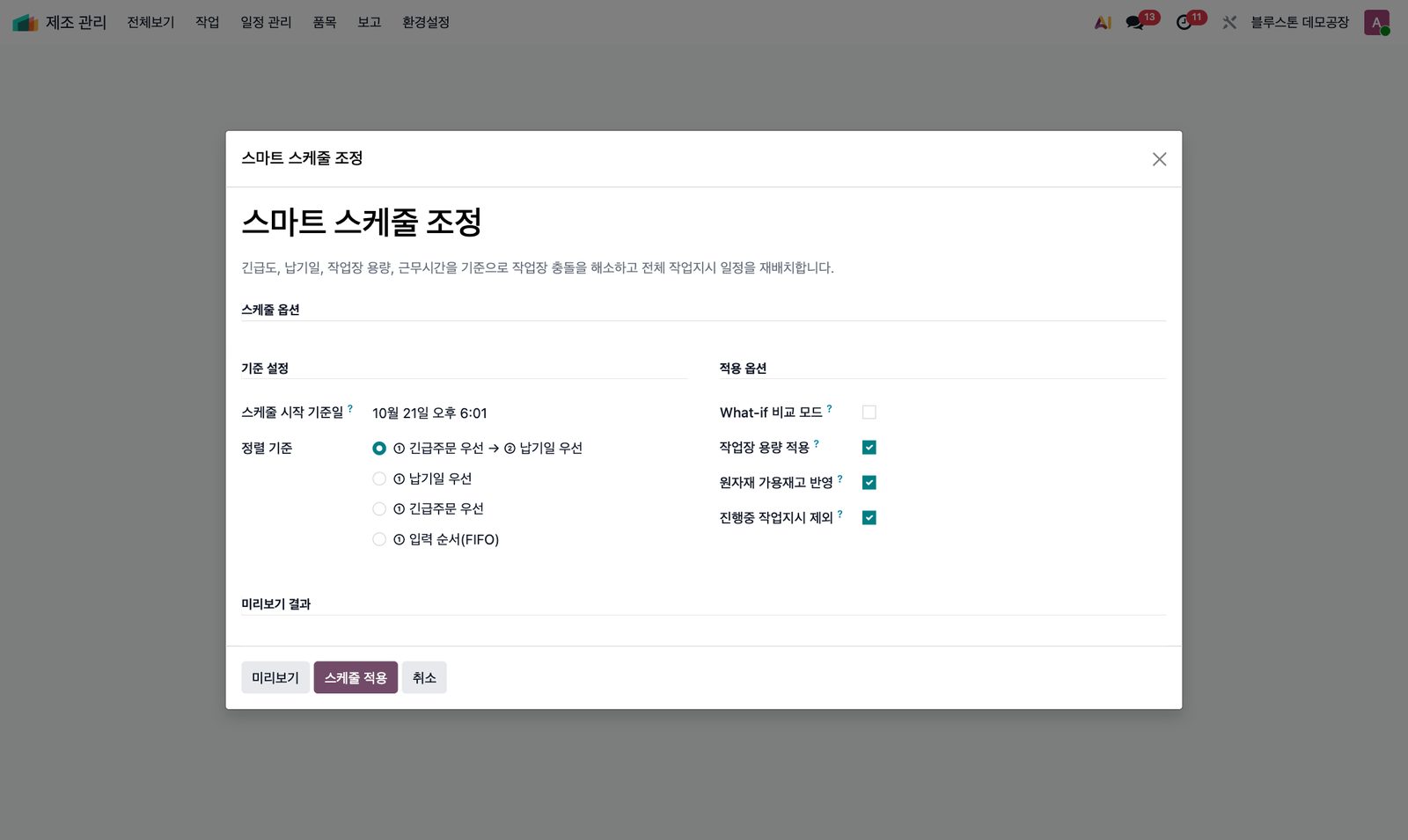
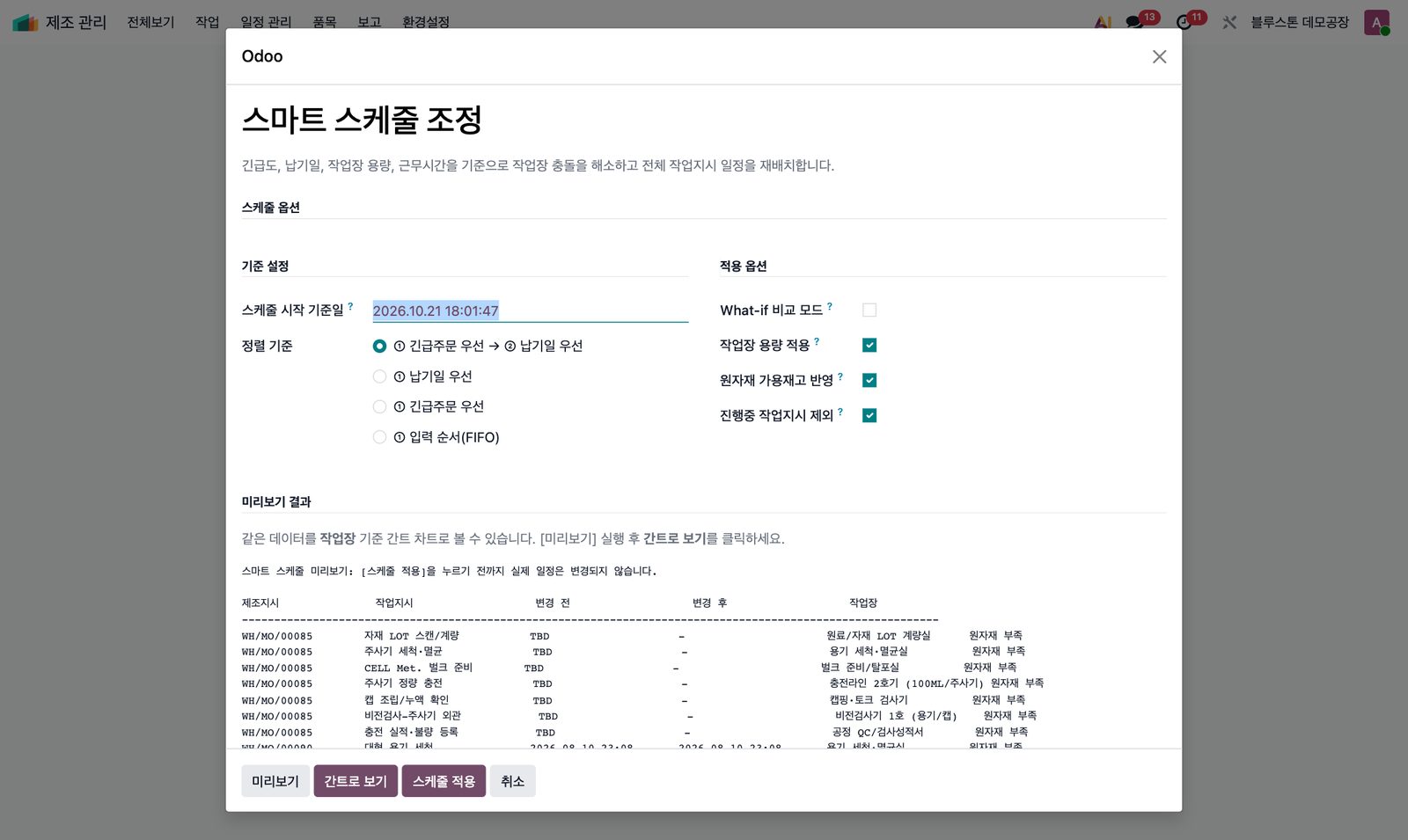
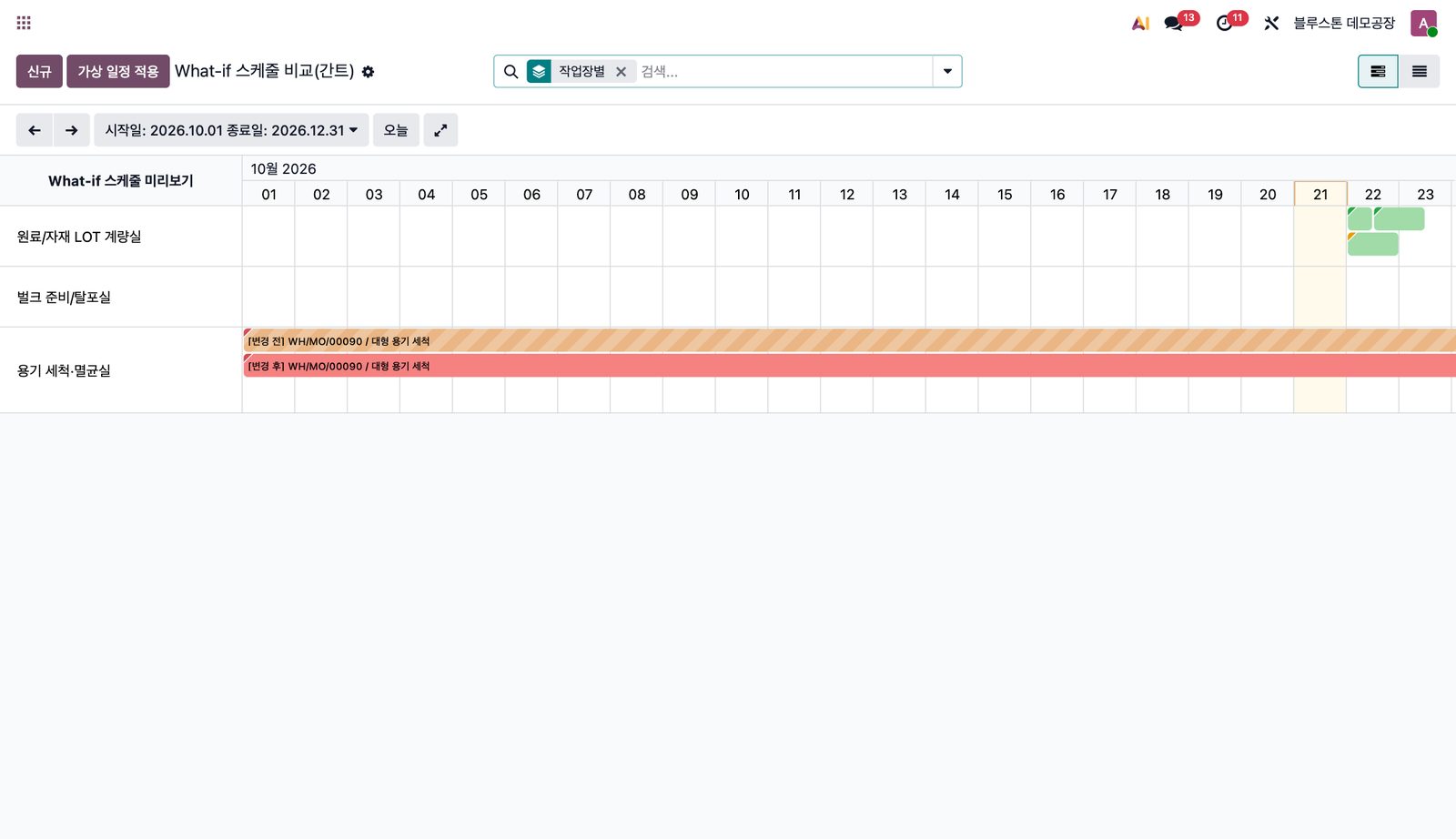
스케줄 조정 위저드Reschedule wizard시작 기준일, 정렬 기준(긴급+납기 / 납기 / 긴급 / FIFO)과 작업장 용량·원자재 가용재고·진행중 작업 제외 옵션을 한 화면에서 고릅니다.Pick the start date, sort rule (urgent+deadline / deadline / urgent / FIFO) and capacity, material and in-progress options on one screen.미리보기 결과Preview result실제 일정은 그대로 두고 작업지시별 변경 전·후 시간과 자재 부족 여부를 먼저 보여줍니다.Shows before/after times and material shortages per work order without touching the real plan.What-if 간트What-if Gantt변경 전·후 일정을 작업장별 간트에서 비교한 뒤 [스케줄 적용]으로 확정합니다.Compare before/after per workcenter on a Gantt, then confirm with Apply.
Forecasting
수요예측을 생산계획으로 바꿉니다Turn demand forecasts into production plans
Odoo 표준 MPS는 예측을 셀 단위로만 입력해 누가·언제·어떤 가정으로 넣었는지 남지 않습니다. BSS Forecasting은 예측을 헤더/라인 마스터로 관리하고 개정·적용 이력을 남긴 뒤 MPS로 연결합니다.Standard MPS only takes forecasts cell by cell, with no record of who entered what or why. BSS Forecasting manages forecasts as header/line masters with revision and application history, then pushes them to MPS.
고객 A × 제품 VITA-C 100mlCustomer A × VITA-C 100ml
월별 수요 · 실적 vs 예측 (EA)Monthly demand · actual vs forecast (EA)버전 관리Version control
개정하면 새 버전이 초안으로 생성되고, 이전 버전은 Superseded로 보존됩니다.Revisions create a new draft; previous versions are kept as Superseded.
MPS 1-클릭 반영1-click MPS sync
확정 예측 수량과 보충 제안을 표준 주생산계획에 한 번에 반영합니다.Confirmed quantities and replenishment go into standard MPS at once.
3개월 롤링 예측3-month rolling forecast
고객 × 제품별 향후 3개월 예측을 집계하고 실적과의 차이를 봅니다.Aggregate 3-month forecasts by customer × product and track variance.
영업팀 입력 위저드Sales input wizard
영업 담당은 간단한 화면으로 제출하고 기획이 검토·확정합니다.Sales reps submit on a simple screen; planners review and confirm.
Next Period PlanningNext Period Planning
성장률을 적용해 다음 기간 예측 헤더를 자동 생성합니다.Generate future forecast headers with a growth rate.
적용 이력 (Audit Trail)Audit trail
언제·누가·어떤 예측을 MPS에 적용했는지 기록되어 S&OP의 근거가 됩니다.Who applied which forecast to MPS, and when — the basis for S&OP.
실제 Odoo 화면으로 보는 ForecastingForecasting — real Odoo screens
 클릭해서 크게 보기Click to enlarge ⤢
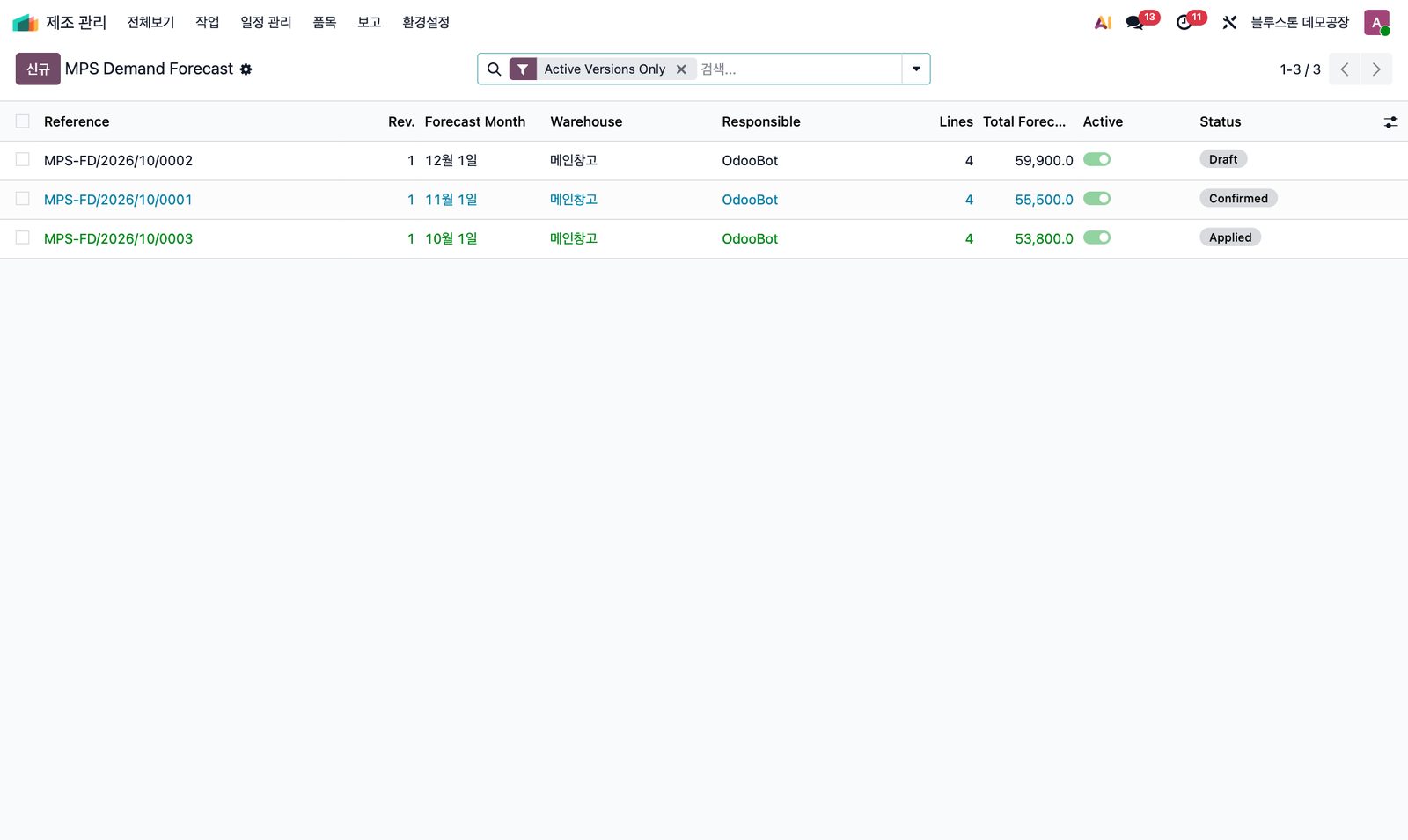
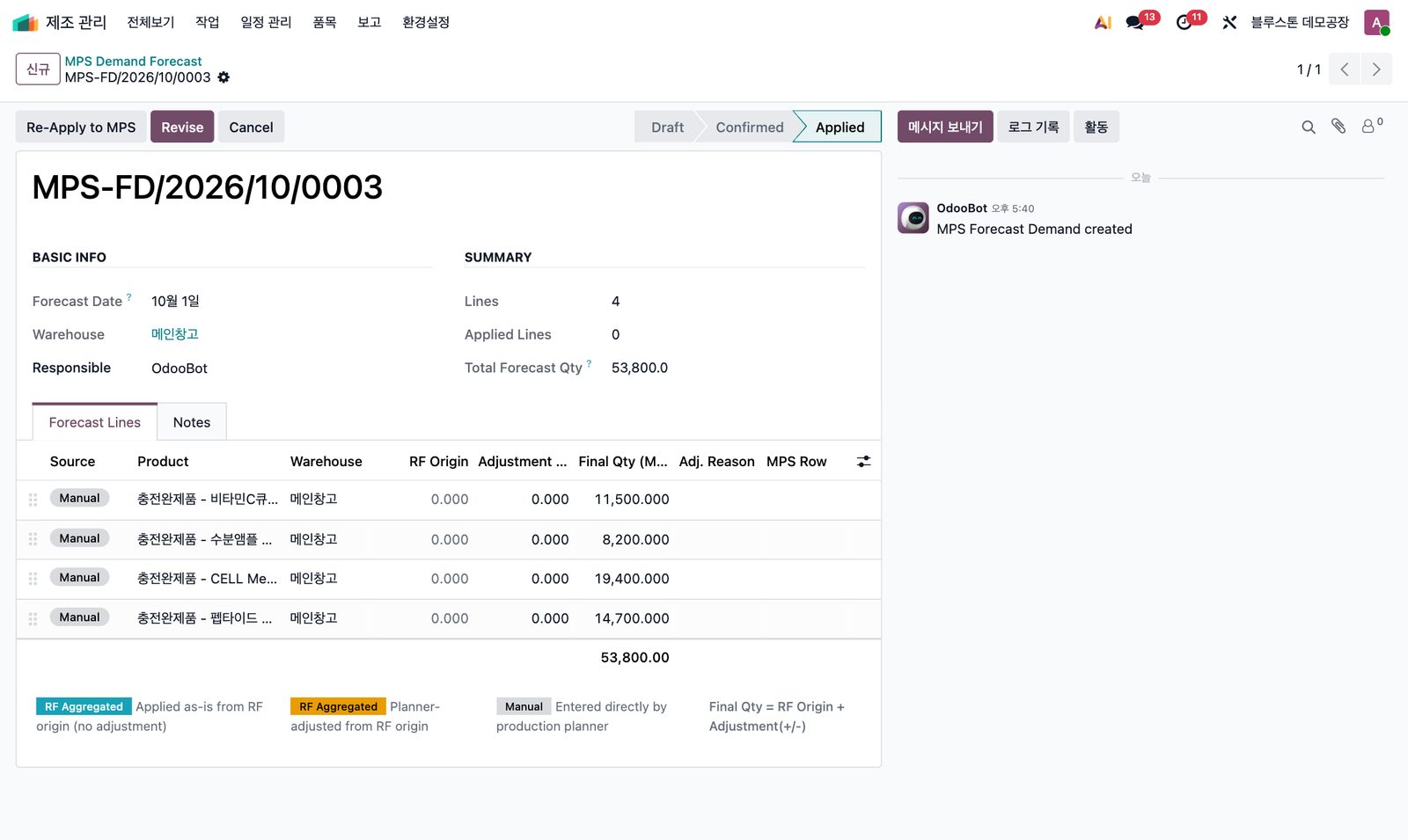
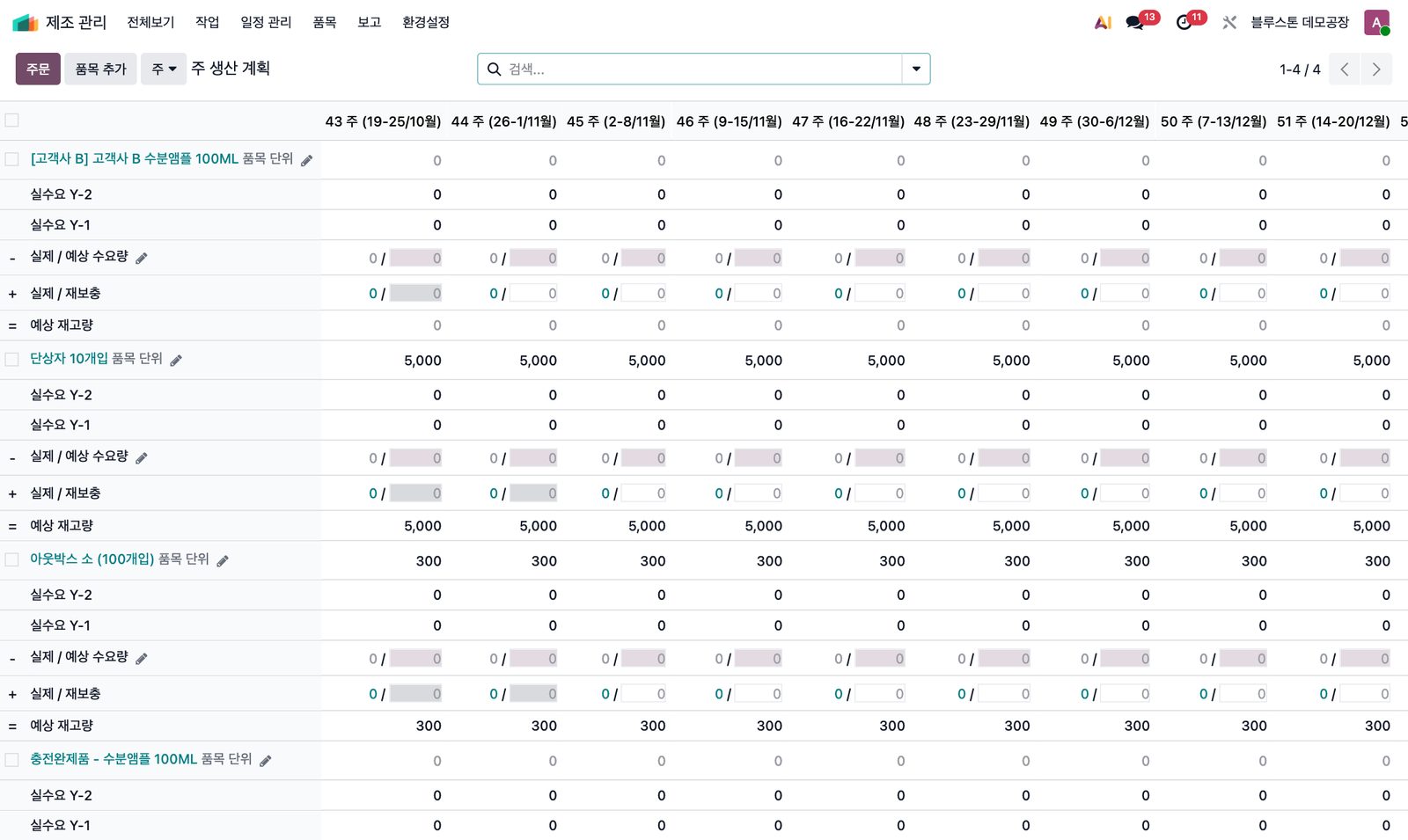
예측 버전 목록Forecast versions월별 예측 헤더가 Draft · Confirmed · Applied 상태와 활성 버전 표시로 관리됩니다.Monthly forecast headers tracked as Draft · Confirmed · Applied with an active-version flag.예측 상세 · MPS 반영Forecast detail제품·창고별 예측 라인, 상태바와 [Re-Apply to MPS] · [Revise] 버튼.Forecast lines per product and warehouse, status bar and Re-Apply to MPS / Revise.주생산계획(MPS)Master Production Schedule반영된 예측이 표준 MPS의 주차별 예상 수요량·보충 수량으로 이어집니다.Applied forecasts flow into weekly demand and replenishment in standard MPS.
Supply Chain Visibility
수요 한 줄에서 공급 전체를 봅니다See the whole supply chain from one demand line
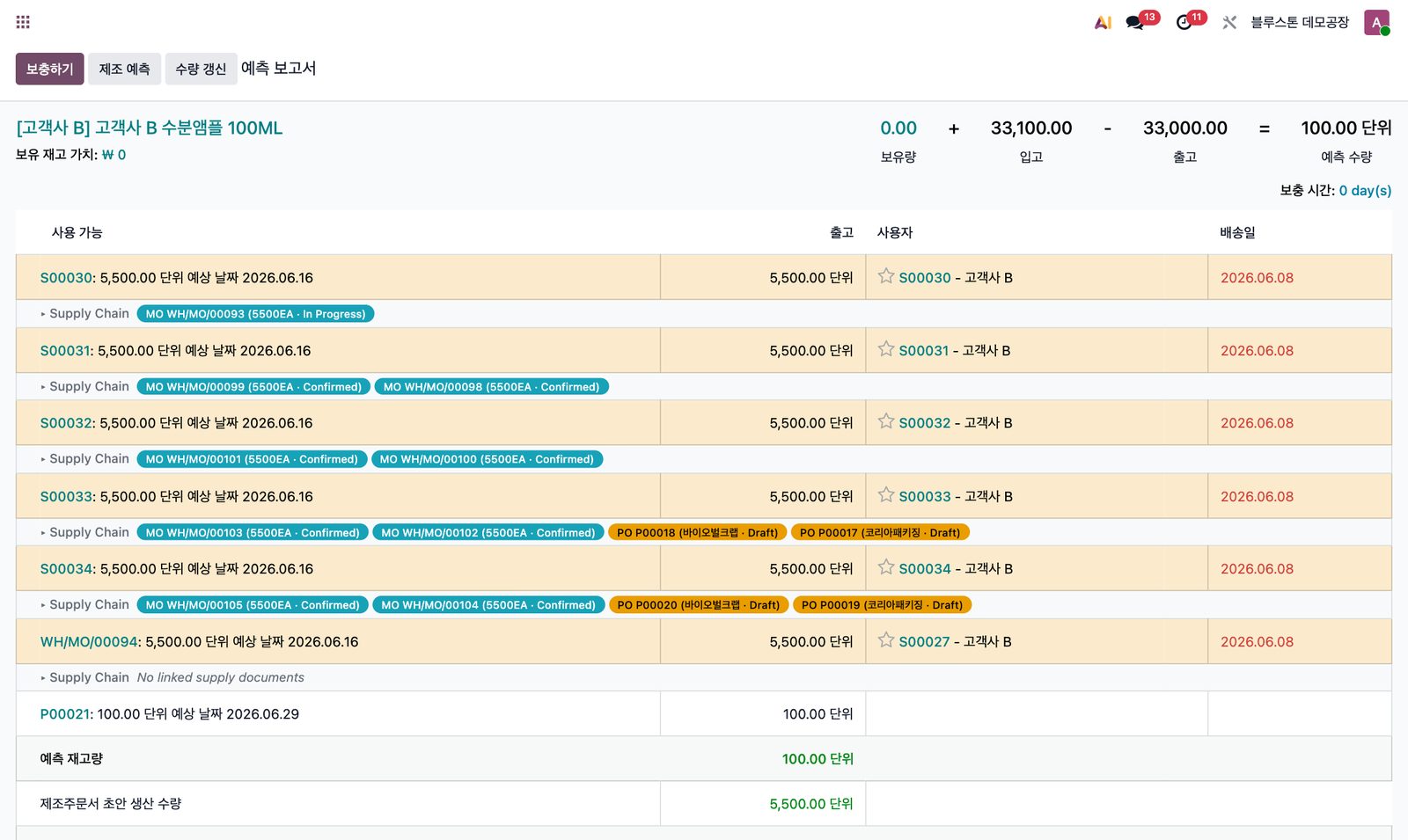
예측 재고 화면의 판매주문 수요 라인 아래에 그 수요를 채우는 제조지시·발주·입고를 배지로 표시합니다.Under each sales-order demand line on the Forecast report, the MOs, POs and receipts that fulfil it appear as badges.
- “생산 들어갔나? 자재는 발주됐나?”를 한 화면에서 확인“Is it in production? Is material ordered?” — answered on one screen
- 배지를 누르면 원본 MO / PO / 입고로 바로 이동Click a badge to open the MO / PO / receipt
- 수요는 있는데 공급이 끊긴 라인을 조기에 발견Spot demand with no supply early
예측 재고 화면에 붙은 Supply Chain 배지Supply-chain badges on the Forecast report
 클릭해서 크게 보기Click to enlarge ⤢
예측 재고 + 공급망Forecast + supply chain판매주문 수요 라인마다 연결된 MO·PO 배지와 상태가 붙고, 공급이 없는 라인은 바로 드러납니다.Each sales-order demand line shows linked MO/PO badges with status; lines without supply stand out immediately.
AI · MES Execution
계획에서 멈추지 않고,
AI와 현장까지 자동으로 연결합니다Beyond planning —
AI and the shop floor, connected
AI 비전검사기·설비가 보낸 결과가 API로 들어와 LOT·작업지시를 찾아 실적에 자동 반영되고, 수율·손실과 품질 기록이 즉시 계산됩니다.Results from AI vision inspectors and equipment arrive by API, are matched to the right LOT and work order, and yield, loss and quality records are calculated instantly.
불량 유형 자동 분류 & 수율Defect classification & yield
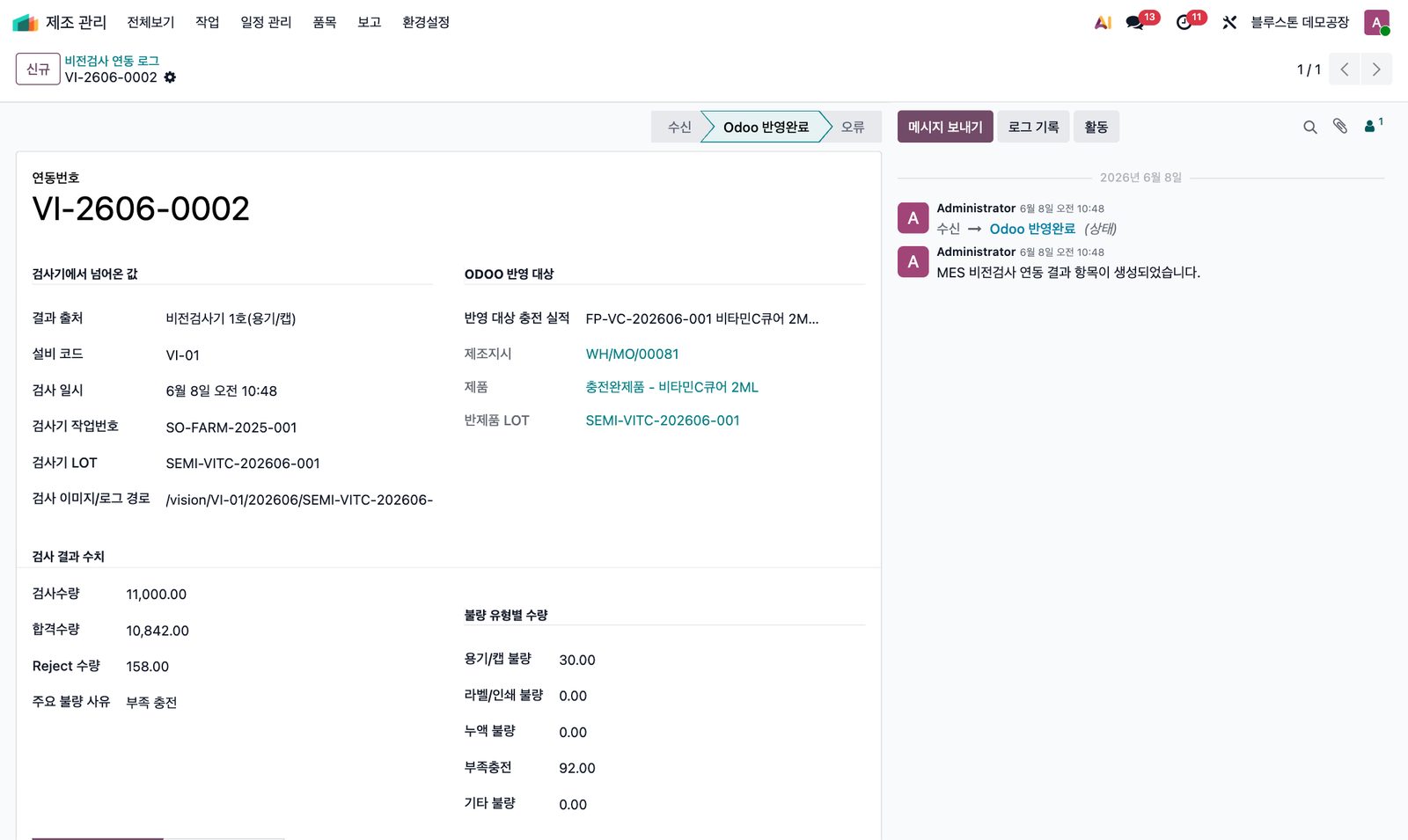
검사 11,000 · 합격 10,842 · Reject 158 → 충전 실적에 자동 반영Inspected 11,000 · pass 10,842 · reject 158 → applied to the filling record
AI 비전검사 연동AI vision integration
용기/캡·라벨·포장 외관 검사기 또는 CSV·API로 합격/Reject와 불량 유형별 수량을 수신합니다.Receive pass/reject and defect counts from inspectors, CSV or API.
통합 공정 입력Unified process input
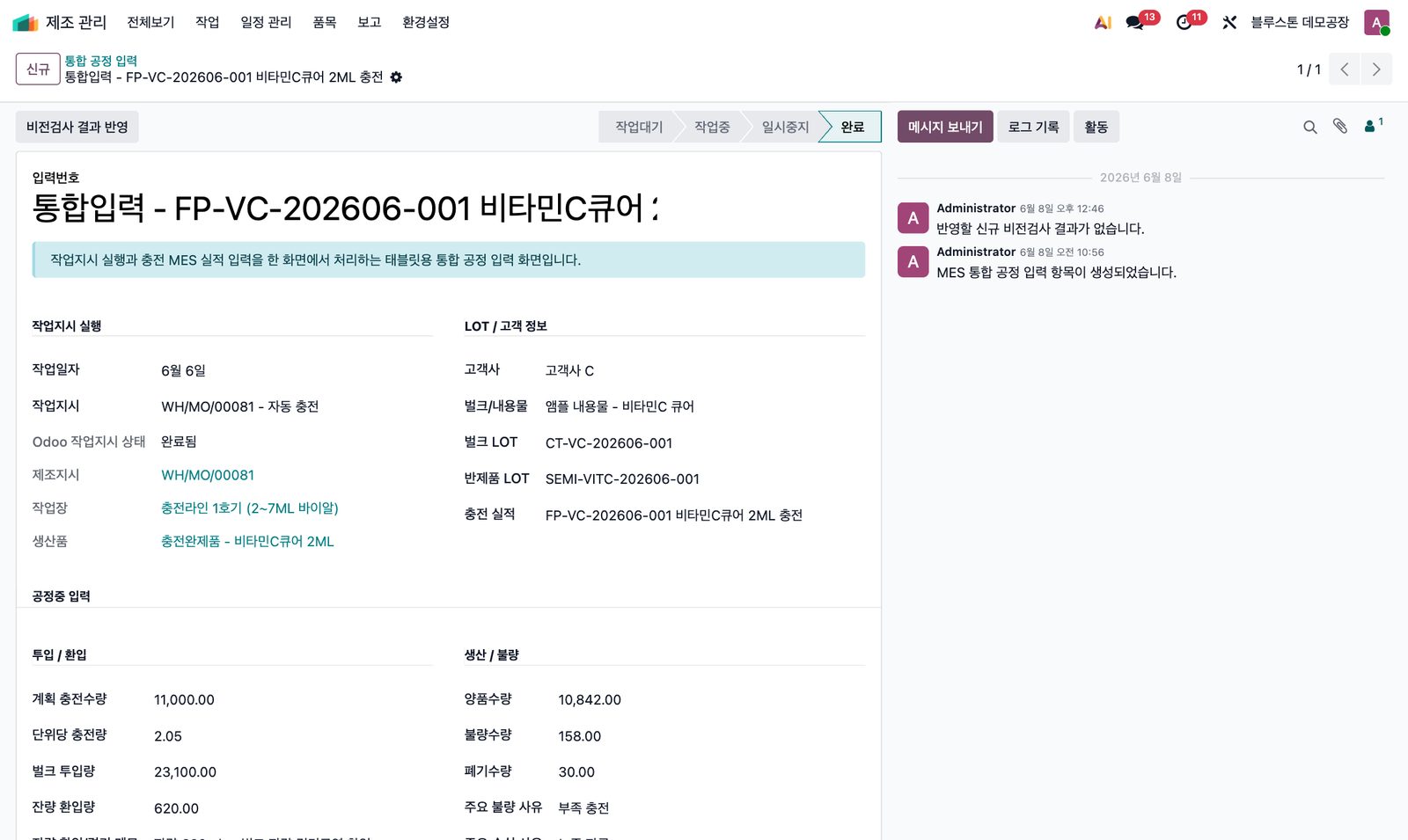
작업지시 상태와 MES 입력이 동기화되고 수량을 한 화면에서 입력합니다.Work-order states sync with MES input; quantities on one screen.
수율 · 손실 자동 계산Yield & loss
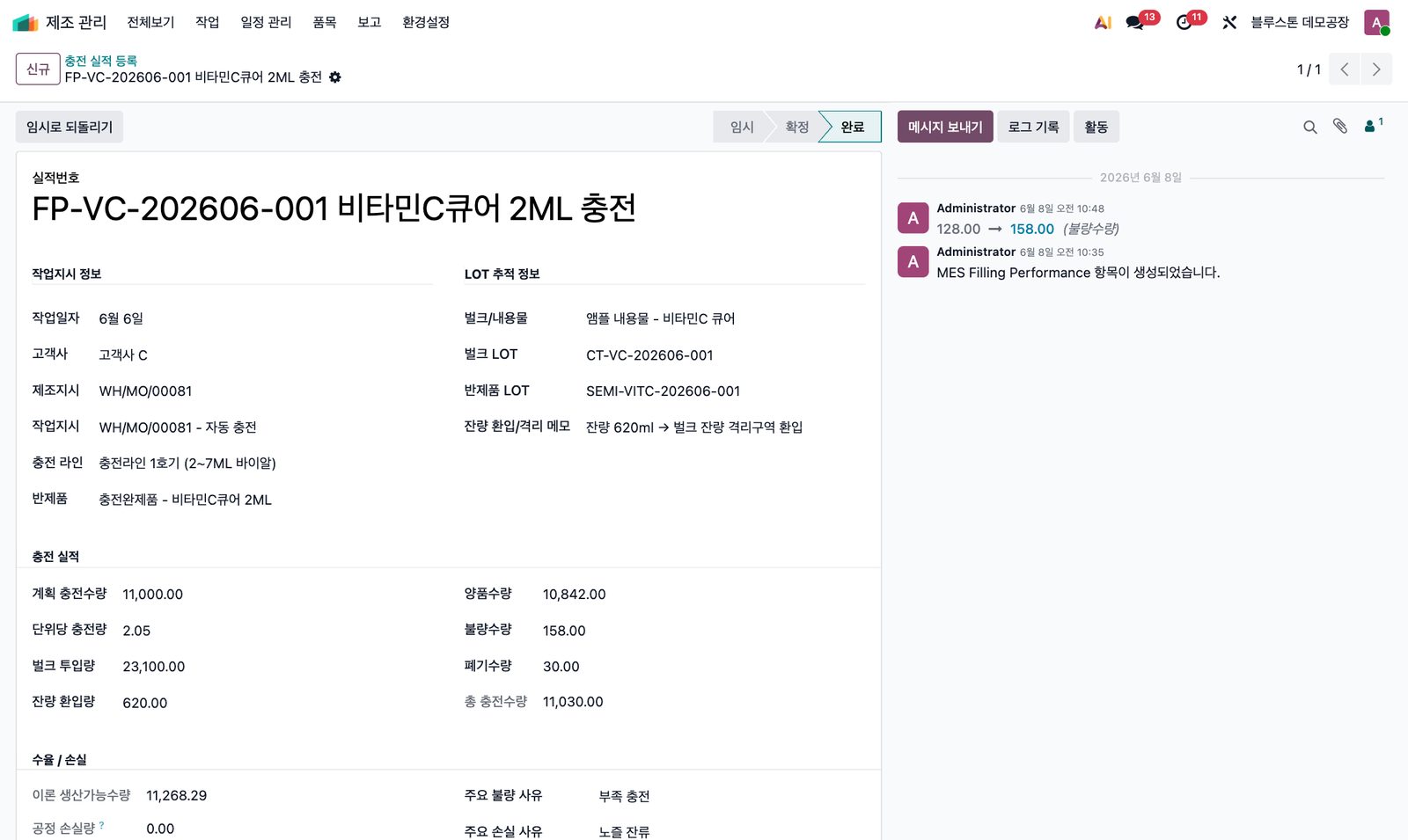
투입량·환입량·충전량으로 이론 생산량, 손실, 수율(%)을 계산합니다.Theoretical output, loss and yield % from input, return and fill volume.
GMP 문서 · 검사성적서GMP docs & certificates
SOP·제조기록서·점검표와 원료·반제품·완제품 성적서를 버전과 함께 관리합니다.SOPs, batch records, checklists and certificates with versions.
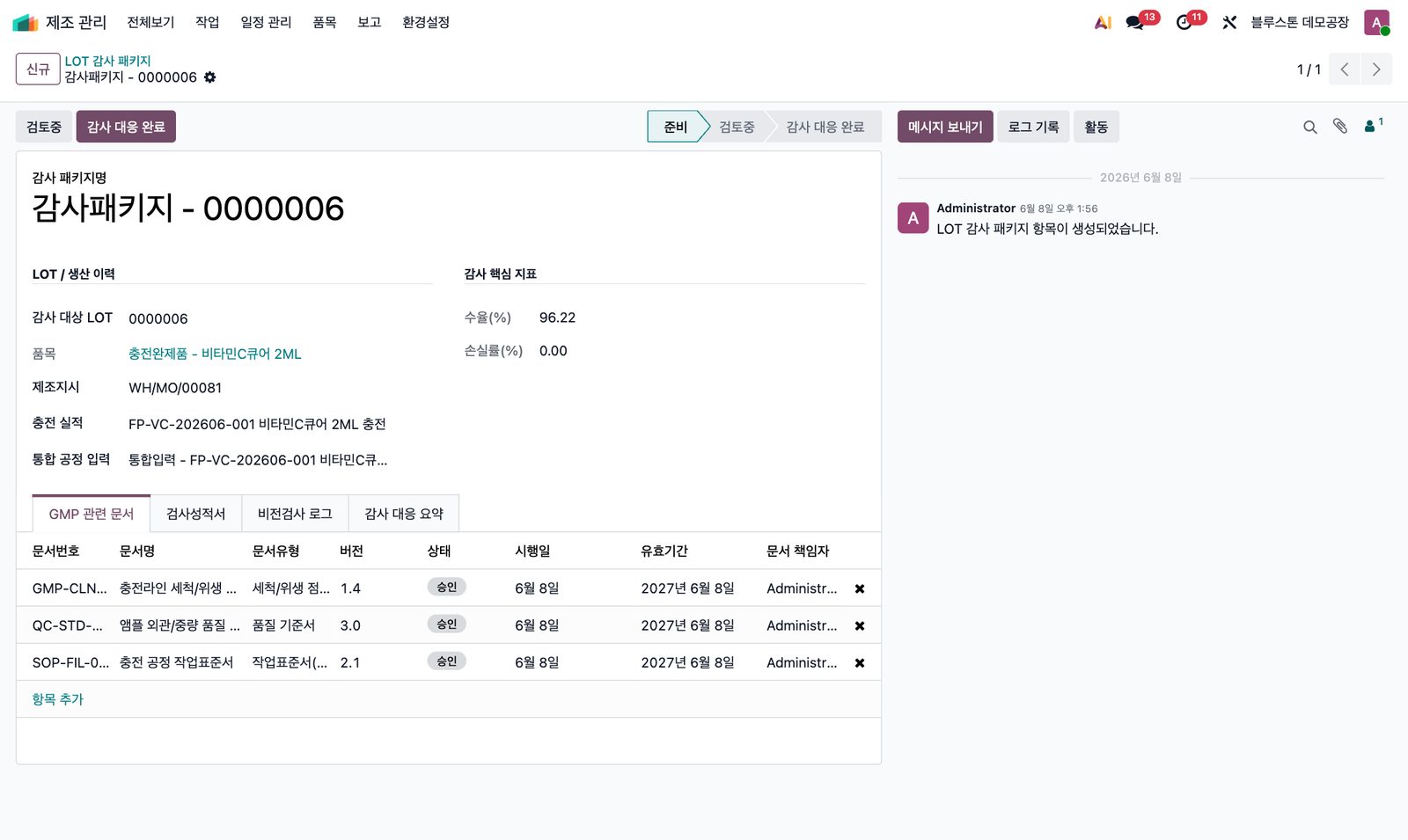
LOT 감사 패키지 자동 생성Automatic LOT audit package
완료 시점에 LOT 기준으로 실적·검사·성적서를 묶은 패키지가 만들어집니다.On completion, results, inspections and certificates are bundled per LOT.
실제 Odoo 화면으로 보는 MES · AI 비전검사 연동MES & AI vision — real Odoo screens
 클릭해서 크게 보기Click to enlarge ⤢
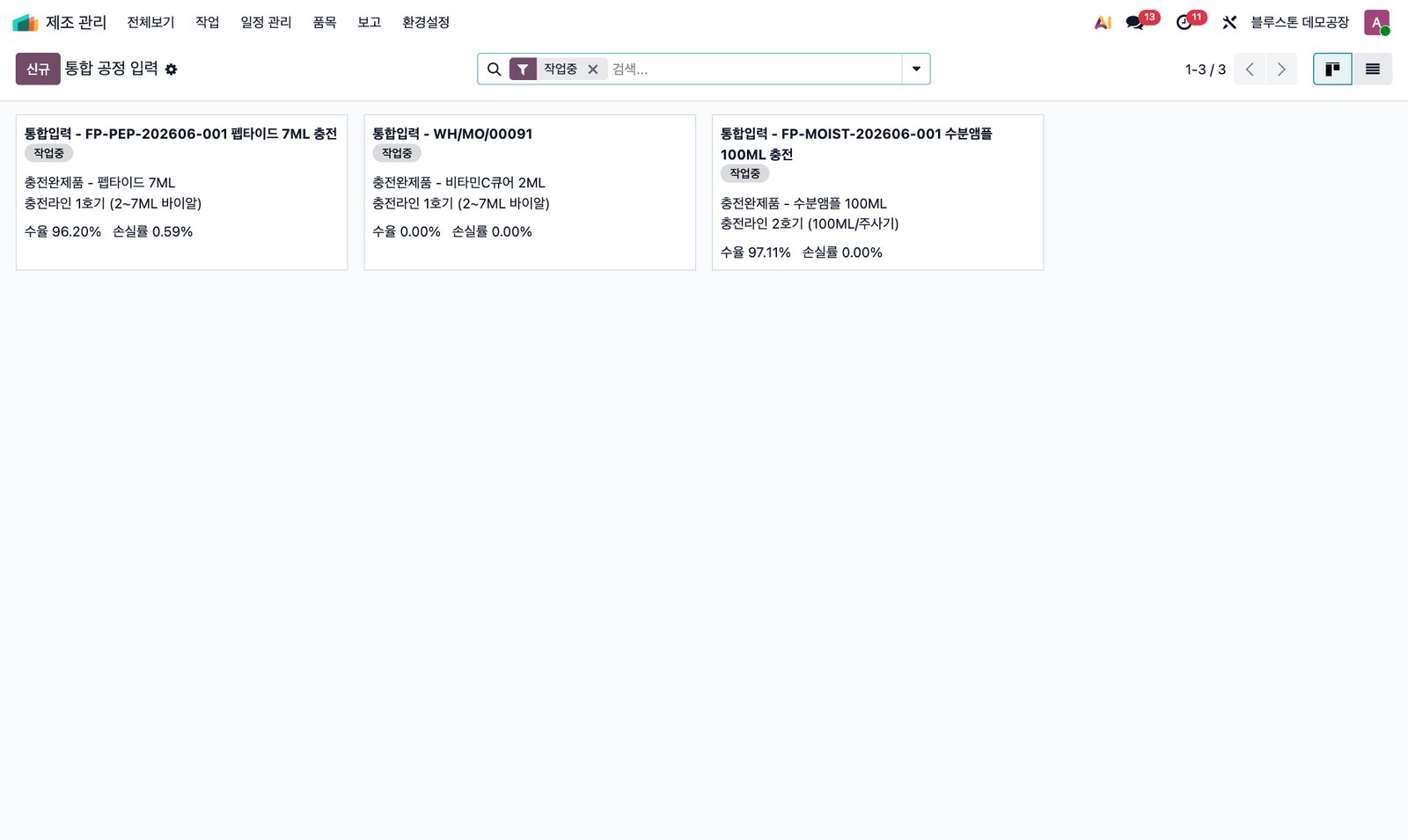
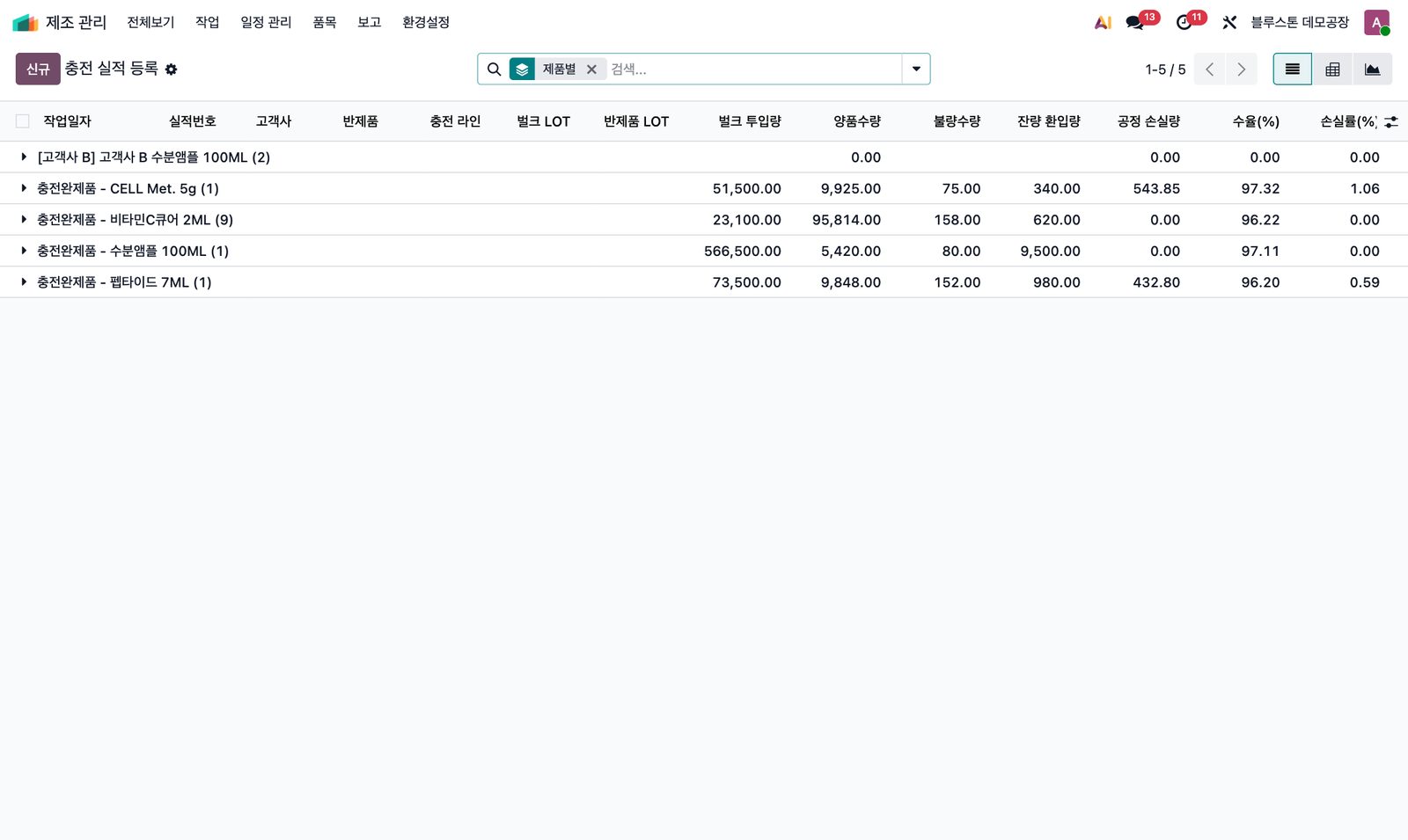
통합 공정 입력Process input진행 중인 작업을 카드로 보고, 카드마다 반제품·충전 라인·수율·손실률이 표시됩니다.Live jobs as cards with product, line, yield and loss.공정 입력 상세Process detail작업대기 → 작업중 → 일시중지 → 완료 흐름과 투입/환입·양품/불량/폐기 수량을 한 화면에서 입력합니다.Waiting → running → paused → done, with input/return and good/defect/scrap quantities.충전 실적Filling recordLOT 추적 정보와 이론 생산가능수량·공정 손실·수율을 자동 계산합니다.LOT traceability plus auto-calculated theoretical output, loss and yield.실적 분석Performance analysis제품별 투입량·양품·불량과 수율(%)·손실률(%)을 비교합니다.Compare input, good, defect, yield % and loss % by product.AI 비전검사 로그AI vision log검사기 결과(합격·Reject·불량 유형)가 대상 실적·LOT에 자동 매칭되어 반영됩니다.Inspector results (pass, reject, defect types) auto-matched to the right record and LOT.LOT 감사 패키지LOT audit package수율·GMP 문서·검사성적서·비전검사 로그를 LOT 기준으로 묶어 감사에 대응합니다.Yield, GMP docs, certificates and vision logs bundled per LOT for audits.
“조건 → 자동 동작”으로 공장의 규칙을 시스템에Your factory rules, as “when → then” automation
필요한 만큼 고르고, 한 번에 통합하세요Pick what you need — or take the whole suite
BSS MRP Smart Scheduler
조건 기반 스케줄 자동화, What-if 간트Rule-based scheduling, what-if Gantt
BSS MPS Forecast Demand
수요예측 마스터, 롤링 예측, MPS 연동Forecast master, rolling forecast, MPS sync
BSS MRP Forecast Supply Chain
예측 재고 화면의 MO/PO/입고 배지MO/PO/receipt badges on the forecast report
bss_mrp_suite
BSS Manufacturing Suite
위 3종 + MES 실적·AI 비전검사·GMP/LOT 감사All three + MES records, AI vision, GMP/LOT audit
이런 현장에 맞습니다Built for plants that…
- 주문 변경과 긴급 생산이 잦아 일정 재조정에 시간을 많이 쓰는 현장spend hours re-planning around order changes and rush jobs
- 영업 예측과 생산계획이 엑셀로 나뉘어 S&OP 기준이 흔들리는 조직run sales forecasts and production plans in separate spreadsheets
- 충전·포장처럼 수율/손실과 LOT 추적이 중요한 화장품·식품 제조need yield, loss and LOT traceability — cosmetics, food, consumer goods
- GMP 문서와 검사성적서를 LOT 단위로 묶어 감사에 대응해야 하는 현장must bundle GMP documents and certificates per LOT for audits
도입은 이렇게 진행합니다How rollout works
진단Assess현재 일정·예측·실적 흐름과 데이터 확인Review current scheduling, forecasting and data
파일럿Pilot한 라인/제품군에 스케줄러·예측 우선 적용Start with one line or product family
연동IntegrateAI 비전검사·설비 API와 실적 흐름 연결Connect AI vision and equipment APIs
확산Scale전 라인 확대와 운영 지표 정착Roll out to all lines and lock in KPIs
우리 공장의 일정과 예측,
함께 점검해 보세요Let’s review your schedule
and forecasts together
현재 생산계획 방식과 현장 흐름을 알려주시면 적용 가능한 모듈 조합과 파일럿 범위를 제안하고, 데모 환경에서 실제 흐름을 보여드립니다.Tell us how you plan production today. We will propose the right module mix and pilot scope, and walk you through a live demo.